
A product configurator lets a visitor build a particular combination: perhaps a finish, size, material and accessory set. Its visual design can be exciting, but the project becomes dependable when the business rules are clear.
For a Cheltenham maker or specialist retailer, those rules may already live in a spreadsheet or in the owner's knowledge. Before commissioning the interface, collect them in a form that someone else can follow. A website cannot reliably sell combinations that the business has not defined.
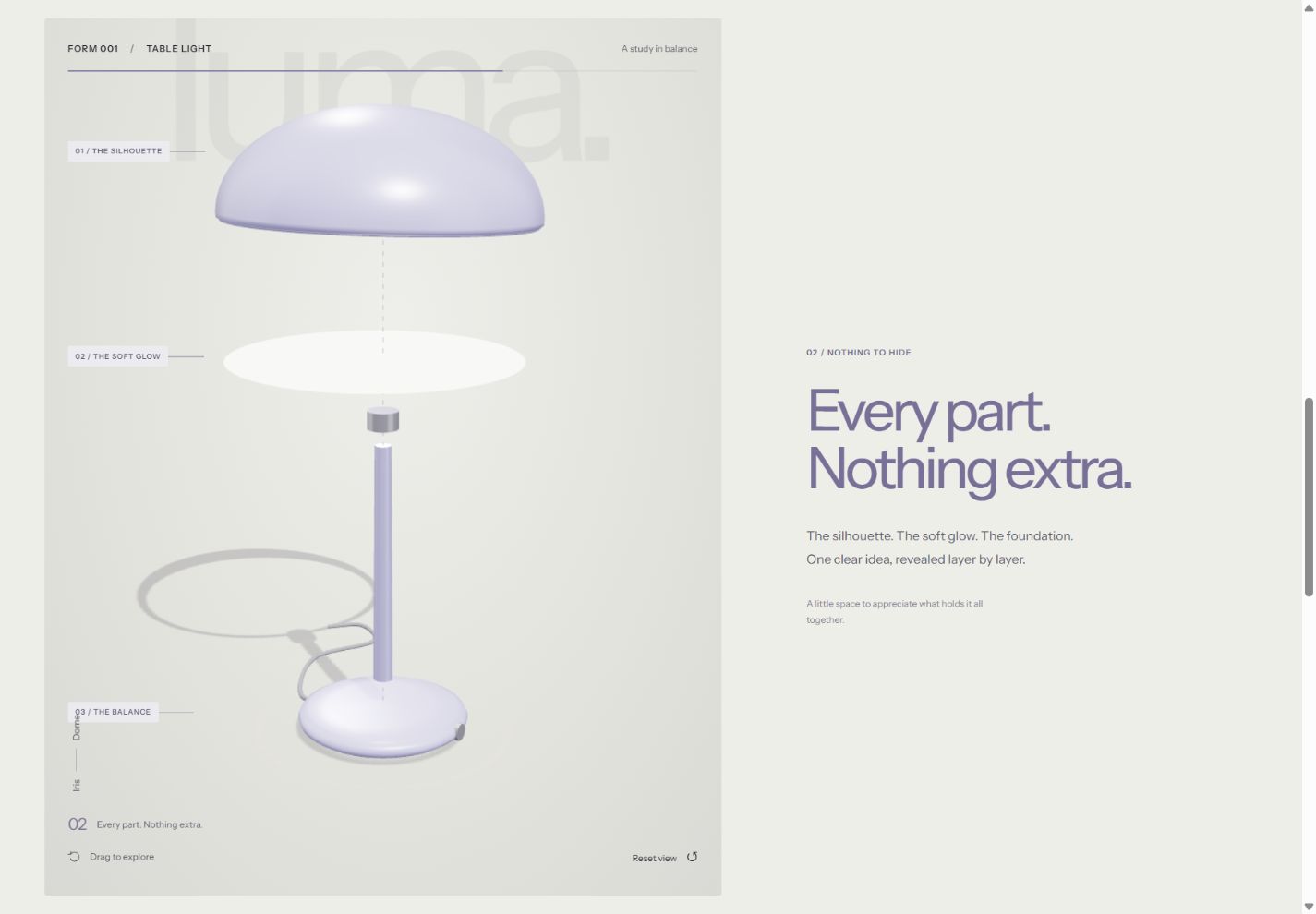
See the idea in action
LUMA / 01
On desktop, scroll to take the lamp apart. Try its finishes, shade shapes and lighting controls on desktop or mobile.
Original concepts for fictional brands, created by Singularity Shift.
Decide what the completed configuration means
Begin with the final action. Does the visitor receive an indicative specification, request a quotation, reserve stock or place an order? These are different deliverables.
An enquiry tool might send a set of preferences for your team to review. An ordering tool needs confirmed product identifiers, valid prices, availability and a reliable connection to the system that accepts the order. Make the wording on the button match what actually happens.
The LUMA lighting concept illustrates the presentation layer. Visitors choose a finish and shade shape, adjust the displayed brightness and save a combination in their browser. On larger screens with motion enabled, its 3D scene also reveals the parts through scrolling. It is a fictional demonstration, with no pricing, inventory or ordering system.
Separate saleable options from viewing controls
Not every control creates a different product. Changing the viewing angle is a presentation choice. A brightness slider might demonstrate a feature that every lamp has. A shade option, however, could identify a different item that must be manufactured or stocked.
List the choices and classify their effects:
- Does this choice change the product identifier?
- Does it change the price or delivery estimate?
- Does it require another option?
- Does it make an existing choice unavailable?
- Is it simply changing the preview?
This prevents the visual model from becoming the accidental source of business logic. Your stock or product catalogue should still identify what the visitor is actually requesting.
Define valid combinations and helpful explanations
Write down any compatibility rules before building the controls. A hypothetical furniture business might offer one base only with larger tops, or one finish only on a particular material. Label such examples as planning examples until the business confirms its real range.
Decide whether unavailable choices should be hidden or shown with an explanation. If changing a material would remove a previously selected option, make that consequence clear before the visitor continues.
Include a recovery route. Customers should be able to change their minds without losing every choice, and they should not reach the final step with a combination that cannot be supplied.
Prepare examples of valid, invalid and borderline configurations. These give the developer and the product expert something concrete to review together.
Agree where prices and availability come from
Identify the system that holds the current information and the person responsible for it. Avoid maintaining one price list for the website and another for the team unless there is a deliberate process keeping them aligned.
For quotation requests, explain what is provisional and what the team will confirm. For orders, decide when the final price and availability are checked and what happens if they change while someone is choosing.
Visible form checks are useful, but they do not replace checks in the system accepting the request. MDN's validation guidance explains why browser validation can be bypassed and must be backed by server-side validation. In a commercial configurator, that includes verifying the allowed combination and authoritative price.
Make the handoff readable
The final summary should identify the selected product and options in language both the customer and your team understand. Include relevant quantities, measurements and references, with a way to correct them.
Think through the next person who sees the configuration. Does a salesperson receive a clear enquiry? Can the fulfilment team distinguish the variants? Will a customer recognise the same choices in their confirmation?
Saving a choice locally is a separate feature. Browser storage can preserve information between visits, as MDN describes for localStorage, but a browser-saved combination is not an order, stock reservation or shared account record. Choose the persistence method that matches the promise you make.
Keep the catalogue understandable outside the tool
Product information should also exist as readable page content. Visitors need descriptions, dimensions and relevant delivery information without having to operate every control.
If real variants are sold online, discuss their page addresses and search presentation as part of the catalogue design. Google's product-variant guidance describes how related products can be represented using variant and group information. That work depends on accurate catalogue data; adding structured data does not create the missing product rules.
Start with a representative slice of the range
A useful prototype includes one common configuration and one awkward rule. An attractive example where every option works with everything else can hide the difficult part of the project.
Review the visual experience, the invalid-choice explanations and the final handoff together. Then decide how to extend it across the range. The interactive product guide covers choosing a presentation style; the ecommerce planning guide covers the wider shop.
James provides website design and development in Cheltenham. Send your option list, existing catalogue and intended final action to discuss a configurator that fits the way your business operates.