A product launch website should explain the product, help visitors judge whether it suits them and make the available next step clear. That step depends on what the business is ready to deliver: a conversation, a product announcement, a stockist introduction or a purchase.
Agree that destination before designing the opening sequence. An impressive demonstration can introduce an object, but someone who wants it still needs to understand its status and what to do next.
LUMA / 01 is a fictional lighting concept that demonstrates an interactive presentation. Visitors can explore an imagined table lamp, change its appearance and keep a combination. It is not a live product offer, ordering system or payment flow.
See the idea in action
LUMA / 01
On desktop, scroll to take the lamp apart. Try its finishes, shade shapes and lighting controls on desktop or mobile.
Original concepts for fictional brands, created by Singularity Shift.
Write a launch statement you can stand behind
Begin with a short description of the real product and its launch status. Explain who it is for, what it does and which details are confirmed.
If manufacturing, options or availability are still being decided, reflect that in the page. A prototype, a planned range and a product ready to dispatch should each be described accurately. Decide who approves changes as the launch approaches.
For a hypothetical product designer based in Cheltenham, a first release might support conversations with independent retailers. In that case, the page needs useful product information and a trade enquiry route. It does not automatically need consumer checkout.
Collect the material a visitor would reasonably expect: clear photographs or labelled visualisations, dimensions, materials, available variants and practical use information. Claims about performance or manufacturing should come from your evidence rather than the design treatment.
Choose a demonstration that answers a question
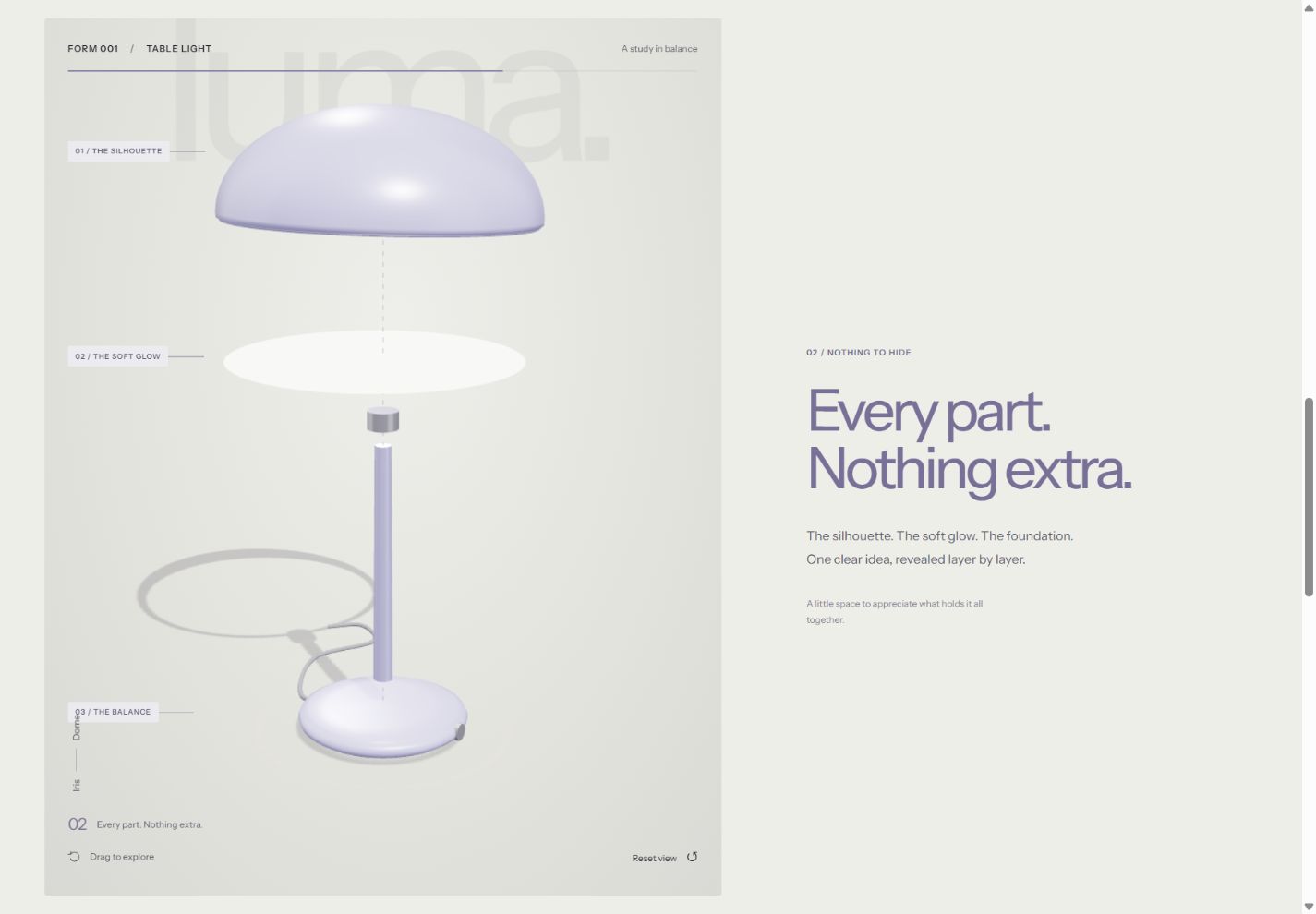
LUMA offers three finishes, two silhouettes and a brightness control. The visitor can rotate the lamp to inspect its form, change the options and see the displayed combination update.
On suitable larger screens, its scroll sequence also separates the shade, diffuser and base before bringing the object together. This illustrates how a website can reveal a product through a sequence of views.
For your launch, list the questions a demonstration would answer. Does someone need to understand the shape from another angle? Compare a finish? See how components fit together? If the question is simply how large an object is on a desk, a contextual photograph and dimensions may be more useful than rotation.
A digital lighting preview is also an illustration. It cannot establish how a real lamp will illuminate a particular room. Similarly, a screen image should not replace accurate specifications or any physical samples needed to judge the product.
The interactive product website guide explores ways to match an interaction to the information being presented.
Define what happens to a chosen combination
LUMA lets visitors keep their selected finish, silhouette and displayed brightness in their browser. Where browser storage is available, the combination can be restored on a later visit in that browser. If storage is unavailable, the interface says the selection is kept for the current visit.
Saving does not send anything to a business or create a reservation. That boundary is explicit in the demo.
A live launch needs a deliberate decision about the same moment. Perhaps the selection accompanies an enquiry, becomes a shareable reference or maps to a purchasable product. Decide which details should travel with it and how the recipient will identify the configuration.
If some combinations cannot be manufactured, the page must reflect those rules. Do not show every possible choice merely because the visual model can display it. The configurator planning guide covers options, valid combinations and the work behind them.
Plan the simpler presentation too
A launch can be viewed on many different devices. For interactive 3D, browser support is only part of the picture: compatible device hardware also matters, as the MDN WebGL documentation explains.
LUMA includes an illustrated fallback when its 3D experience is unavailable. Its finish, silhouette and brightness controls can still update that preview. The desktop scroll sequence is also separate from the basic product controls.
Specify what remains available when an enhancement is missing. Product information, option labels and the next action should still be understandable. Review the experience using a keyboard and a phone, and with non-essential motion reduced. These checks need to cover the whole journey, not just the opening object.
Match the page to the launch phase
Before orders are possible, the site can explain the product and provide a clearly scoped enquiry route. If collecting requests for future updates is part of the brief, plan what people are signing up for and how the business will manage those requests.
When sales begin, product information must connect to real commercial operations. Prices, stock, delivery, payment and the records staff use to fulfil orders need their own implementation. A saved visual configuration does not supply those systems.
After launch, nominate someone to update availability, replace provisional material and maintain the product information. The ecommerce planning guide is useful when the next phase includes online sales.
Prepare the first version around a decision
A useful launch brief includes the product's current status, the audience, approved information, representative visual assets and one primary next action. Add any options visitors can genuinely choose, plus who will receive or process the result.
For website design and development in Cheltenham, I can help turn that brief into a considered product experience. Tell James what you are launching, which details are ready and what you want visitors to do first.